



Unlock Growth: 7 Common Website Analytics Setup Pitfalls to Avoid
In the digital age, data is the compass that guides business strategy. You rely on website analytics to understand customer behavior, measure marketing effectiveness, and make informed decisions that drive growth. But what if that compass is broken? A flawed website analytics setup can provide misleading information, causing you to invest in the wrong channels, misunderstand your audience, and miss crucial opportunities. For many businesses, the data they collect is incomplete or inaccurate, turning a powerful asset into a potential liability.
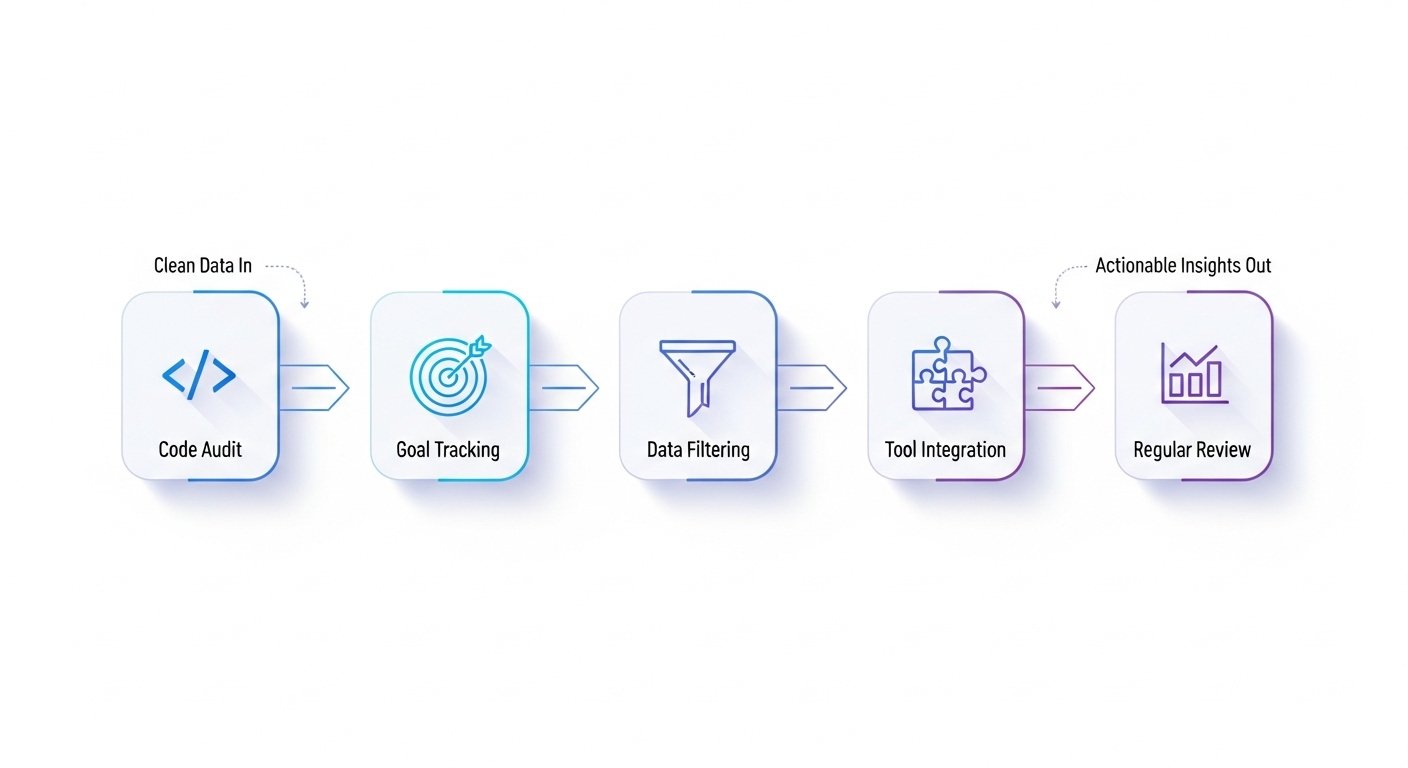
Getting your analytics right from the start is fundamental to online success. It’s about more than just installing a tracking code; it’s about creating a reliable system for capturing the specific actions that matter to your business. This guide will walk you through seven common pitfalls in website analytics configuration and provide actionable steps to ensure you’re collecting clean, trustworthy data.
1. The Shaky Foundation: Incorrect or Incomplete Tracking Code
The most basic yet surprisingly common error is an issue with the analytics tracking code itself. This small snippet of JavaScript is the bridge between your website and your analytics platform (like Google Analytics 4). If it’s not installed correctly on every single page, you’re losing data. Common problems include the code being missing from new landing pages, blog posts, or checkout confirmation pages. Another issue is having duplicate tracking codes, which can inflate your traffic numbers and skew metrics like bounce rate.
How to Fix It: Use browser extensions like Google’s Tag Assistant to crawl your site and verify that your tag is present and firing correctly on all pages. Perform a manual check of key page templates in your CMS (e.g., header, footer) to ensure the code is implemented globally.
2. Flying Blind: Ignoring Goal and Conversion Tracking
Receiving thousands of visitors is a vanity metric if you don’t know what they do once they arrive. A critical mistake is failing to define and track conversions. A conversion is any valuable action a user takes, such as submitting a contact form, signing up for a newsletter, making a purchase, or clicking a ‘call now’ button. Without conversion tracking, you can’t measure your return on investment (ROI) or identify which marketing channels are actually delivering results.
How to Fix It: Start by identifying your website’s primary business objectives. Then, configure these as conversion events in your analytics platform. For example, in GA4, you can mark specific events like ‘generate_lead’ or ‘purchase’ as official conversions to see them in core reports.
3. Data Contamination: Forgetting to Filter Internal & Bot Traffic
Your analytics reports should reflect the behavior of potential customers, not your own team. Visits from your employees, developers, and marketing agencies can artificially inflate session counts and distort user engagement metrics. Similarly, spam bots and crawlers can hit your site, creating junk data that makes it difficult to see true performance trends.
How to Fix It: Most analytics platforms, including GA4, have built-in options to filter known bot traffic. For internal traffic, you should create a data filter to exclude traffic from your office IP addresses. This simple step cleans up your data significantly, giving you a more accurate picture of your real audience.
| Metric | Before Filtering (Raw Data) | After Filtering (Clean Data) | Why It Matters |
|---|---|---|---|
| Users | 12,500 | 10,200 | Shows true audience size, not internal/bot traffic. |
| Conversion Rate | 1.8% | 2.2% | Internal users rarely convert, so filtering reveals the true rate. |
| Average Engagement Time | 1m 15s | 1m 45s | Real users are often more engaged than bots or quick internal checks. |
4. A Broken Journey: Neglecting Cross-Domain & Subdomain Tracking
Does your customer journey span across multiple domains? For example, a user might browse your main site at `mybusiness.com` but complete a purchase on a separate e-commerce platform like `shop.mybusiness.com` or a third-party portal. Without proper cross-domain tracking, analytics will see this as two separate users, breaking the journey and losing the original traffic source attribution. This makes it impossible to know which marketing effort led to the final sale.
How to Fix It: Configure cross-domain measurement in your analytics property settings. This involves adding your different domains to a list, which tells the platform to treat sessions across them as a single, unified journey. This is essential for any business with a separate booking engine, shopping cart, or support portal. For more details, you can consult official resources like Google’s guide on cross-domain measurement.
5. Missing the Details: Failing to Track Key User Events
Modern analytics is about more than just pageviews. It’s about understanding interaction. Are users watching your product videos? Are they downloading your PDF case studies? Are they clicking on outbound links? Failing to track these micro-conversions, or events, means you’re missing valuable data on user engagement. These interactions are strong indicators of interest and can help you optimize your content and user experience.
How to Fix It: Use a tool like Google Tag Manager (GTM) to set up event tracking without needing to constantly edit your website’s code. With GTM, you can create ‘tags’ that fire on specific ‘triggers,’ such as a button click or form submission, and send that event data directly to your analytics platform.
6. Working in Silos: Not Integrating with Other Marketing Tools
Your website analytics platform is powerful, but it becomes a true command center when connected to your other tools. By not linking platforms like Google Ads, Google Search Console, and your CRM, you’re looking at fragmented data. Integrating Search Console, for example, allows you to see which search queries are driving traffic to your pages directly within your analytics reports. Linking Google Ads lets you analyze post-click behavior and import conversions for better campaign optimization.
How to Fix It: Explore the ‘Product Links’ section in your Google Analytics admin panel. From there, you can easily establish connections with other Google products. For third-party tools like CRMs, look for native integrations or use middleware to pass data between platforms.
7. Set and Forget: The Myth of One-Time Setup
Perhaps the biggest mistake is treating your website analytics setup as a one-and-done task. Websites evolve, marketing campaigns change, and new features are added. A tracking configuration that was perfect six months ago might be broken or incomplete today. Regular audits are necessary to ensure data quality remains high and that your tracking is aligned with your current business goals.
How to Fix It: Schedule a quarterly or bi-annual analytics audit. During this review, run through the points in this guide: verify your tracking code, review your conversion events, check your filters, and ensure integrations are working correctly. A trusted source like Search Engine Journal offers comprehensive audit checklists that can guide this process.
Frequently Asked Questions
What is the main difference between Universal Analytics (UA) and Google Analytics 4 (GA4)?
The primary difference is the data model. UA was based on sessions and pageviews, while GA4 uses an event-based model. This means every interaction, including a pageview, is captured as an event, providing a more flexible and user-centric view of behavior across websites and apps.
How often should I audit my website analytics setup?
A full audit is recommended at least once or twice a year. However, you should perform quick checks on a monthly basis, especially after launching a new section of your website, a major redesign, or a new marketing campaign, to ensure tracking remains intact.
Can I fix my analytics setup myself?
You can address many basic issues, like setting up standard conversion events or filtering your IP address, using online guides and official documentation from platforms like Google Analytics Help. However, for more complex issues like cross-domain tracking, e-commerce setup, or a full data integrity audit, partnering with a specialist is often more efficient and reliable.
What’s the first step to a better website analytics setup?
The first step is a simple health check. Use a tool like Google’s Tag Assistant to confirm your base tracking code is installed correctly on all pages. This ensures you’re at least collecting baseline data before moving on to more advanced configurations.
Ensuring you have a correct and comprehensive website analytics setup is not just a technical task—it’s a strategic imperative. The quality of your data directly impacts the quality of your business decisions. By avoiding these common pitfalls, you can transform your analytics from a confusing collection of numbers into a clear roadmap for sustainable growth.
If you’re feeling overwhelmed or want a professional eye to guarantee your data is accurate, Digimek can help. We offer expert analytics audits and setup services to give you confidence in your data. Contact us today to build a data foundation you can trust.
